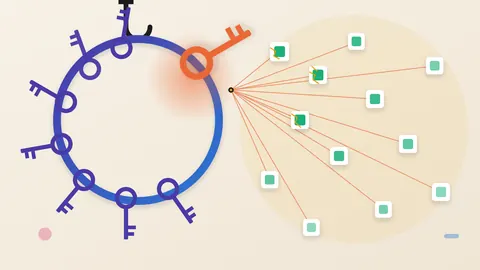
- Huntress says attackers installed rogue ScreenConnect clients on at least 288 endpoints in 48 organizations it works with, in about 90 minutes on November 11.
- Huntress says the activity seems related to RMM+, whose versions 1.0.31 and 1.0.32 accepted a blank access key. ConnectWise says the initial access method is still under investigation.
- Do not triage suspect machines through ScreenConnect. Audit Run Command and Toolbox history, look for a second client, and rotate credentials from a clean device.
The tool that fixes machines can also take them
Remote-management software lets one technician reach many machines. That reach is exactly what an attacker wants. The lesson here is that a remote-access tool is a chain of trust. Every link in it is inherited by each machine the tool manages. Links include add-ons, session logins and the technician's own laptop.
What Huntress saw
Huntress is a security firm. On November 11, 2026, it watched an attacker work through several cloud-hosted ScreenConnect panels. The activity began near 5:47 p.m. UTC. The attacker sent commands to many managed machines at once.
Huntress counted at least 288 machines in 48 organizations that use its service. That is a floor, and it covers only Huntress customers. All 288 fell within 90 minutes. About a third fell in the first 10.
The commands ran as SYSTEM, the top privilege level on Windows. They quietly installed a ScreenConnect client controlled by the attacker. Then they added a toolkit Huntress calls SCKit.
Huntress observed the activity on ScreenConnect releases 26.6.6.9747 and 26.7.6.9783, the most current versions. ConnectWise says it has no evidence that the software itself is flawed.
How a blank key can open the door
Huntress says the activity seems related to RMM+. This is an add-on from a third party. It lets an outside tool drive ScreenConnect sessions with no technician at the console.
Huntress says RMM+ skips ScreenConnect's accounts, roles and MFA. One shared key in its settings is the only gate. In versions 1.0.31 and 1.0.32, the setting defaulted to blank. The check did not reject an empty value. An administrator who never set a key left the door open.
Huntress saw commands reach endpoints on several instances within minutes. It found no matching login events. It also says most RMM+ installs it met were legitimate. The flaw matters only where the key was never set.
How the attacker got in is unconfirmed
ConnectWise makes ScreenConnect. It says it has no evidence that its own systems were breached or that the software has a flaw. As a precaution, it switched off five outside add-ons in more than 400 partner environments. It adds that having an add-on does not prove a compromise.
Huntress told The Hacker News it has seen no new vulnerability. Its data currently points to stolen credentials or hijacked operator sessions. A blank key needs no login. Stolen credentials do. The sources do not say which route was used, or whether both were.
A copy that sits in the original's place
Huntress describes SCKit as 16 files, mostly scripts. It adds exclusions to Microsoft Defender. It installs a second attacker-run client. It creates a scheduled task named TrapWatch. The real ScreenConnect client is stopped and set to manual start. The attacker's copy takes its place.
Huntress says the copy reuses the real client's libraries and connection details, "so the machine still looks normal." Because of that, an online status may not reveal the swap. Huntress also saw affected systems reinfect soon after isolation ended. Isolation alone does not clean them.
A technician's visit is designed to spread the infection
Huntress also studied the code for behavior it had not seen. When a technician connects to an infected machine, the kit is built to fetch a dropper 2.5 seconds later. It then tries to steal the technician's session cookie. With that cookie, it tries to reach every other session the technician can open.
This is design intent. Huntress has not seen the jump to a technician's workstation succeed. It says the takeover step failed in every recovered log it has checked so far.
The risk is still practical. The natural first move is to connect and look. Huntress advises against it. It suggests EDR live response, WinRM or another tool outside ScreenConnect. EDR is endpoint security software.
Huntress also says the C# source for the trap looks written by an LLM, based on its detailed comments. That is one observation about one script.
Questions to put to your team
Ask whether you or your service providers run ScreenConnect. Ask whether it is cloud-hosted or run in-house. ConnectWise asked in-house operators to switch the add-ons off themselves. Ask which add-ons are installed and whether any access key was left blank.
Ask for a review of Run Command and Toolbox history for mass activity nobody started. Ask for a check for a second, unauthorized ScreenConnect client. Huntress recommends ending active sessions and rotating ScreenConnect credentials from a clean device. It also suggests revoking browser and identity-provider sessions, since the kit can steal session tokens.
Huntress says file hashes are weak clues here. The scripts are rebuilt with new values, and the trap is compiled separately on each machine. Behavior checks matter more than hash lists.
This is not the first such event this autumn. In September, Huntress responded to similar worm-like activity with rogue ScreenConnect clients. Huntress says ConnectWise later patched a file-transfer flaw, CVE-2026-84869, rated 9.9 on the CVSS scale. The sources do not say whether the two events are linked.
A remote-access tool is only as trustworthy as its weakest link, whether that is an unset add-on key, a stolen session or a technician's laptop. Which link failed here is still unconfirmed. The technician path is designed, and Huntress has not yet seen it work.
Produced by the WebPulse Newsroom with AI assistance from the original reporting credited below, and checked against that source by our editorial review. How we use AI.
Original reporting: Huntress.